

Many nonresidents are unaware that income earned from investments in the U.S. is subject to tax from the IRS.
What’s more, if you have earned investment income, you may be required to file a tax return.
With this in mind, if you are unfamiliar with the process of managing this tax responsibility, you may be feeling daunted by the task of filing correctly.
In this guide, we will discuss everything you need to know to include investment income on your U.S. tax return.
What is investment income in the U.S.?
In the U.S., investment income is considered to be passive income. This means that it is not effectively connected with trade or business inside the U.S.
This is an important detail as it indicates that the income is taxed differently to regular U.S.-sourced income.
Essentially, investment income is made from interest payments, dividends, or capital gains realized on the sale of stock or other assets.
For example, Cryptocurrency is one of the most popular areas where investment income is earned in the U.S.
So, if you made a profit during the tax year on any cryptocurrency (which you traded from a U.S. exchange or broker) while you were living within the U.S., you will have to declare it on a tax return.

Is there investment income tax in the U.S.?
Yes, if you earn investment income as a nonresident in the U.S., you will be taxed on it.
However, many nonresidents are not aware of this tax on investment income in the U.S. Usually, any share of investment profit you make will be charged at the regular Capital Gains Tax (CGT) rate of 30%.
Dividends received from your investments will also be taxed at 30%.
However, if you were in the U.S. for 182 days or less during the tax year you will not be subject to U.S. capital gains tax.
Additionally, if your home country has a tax treaty with the U.S., you may be able to claim a reduction in taxes paid.
What forms do I need when filing my investment income tax return?
If you earned income through Robinhood, eToro or a similar system, it’s likely you’ll receive a 1099-B form. If you engaged in the disposal, sale, exchange, or transfer of any digital assets (such as cryptocurrencies), you should also receive a 1099-DA form.
You will receive your 1099-B and 1099-DA forms from your broker or banker. The information on these forms will need to be outlined on your 1040NR tax return.
Form 1099-B
Form 1099-B outlines gains and losses throughout the year for the trader and information on the form such as the date the share was acquired and sold will be needed to complete it.
Form 1099-DA
For the 2025 tax year, Form 1099-DA will only include proceeds from the sale or exchange of digital assets. For the 2026 tax year, this will be updated to include cost basis information. Information on this form will be used to help fill out your 1040NR tax return.
How do I use Sprintax to file my investment income?
Sprintax Returns can help you complete your 1040NR form so that your investment income is reported properly.
Once you receive your 1099 form from your broker or banker, you will need to complete your tax return 1040NR with the information from the 1099-B, 1099-Int or 1099-Div forms you received.
Remember, it’s vitally important you report your investment income tax on your tax return. Doing so will keep you compliant with the tax authorities.
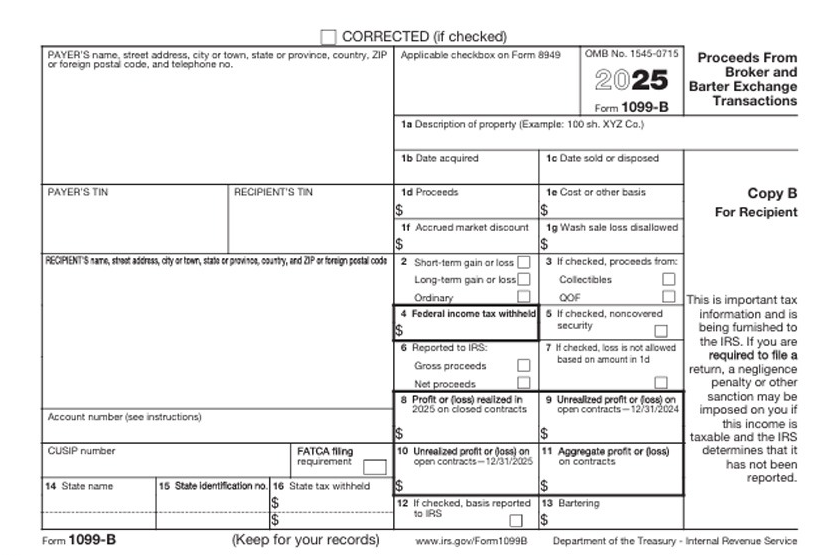
Below, you can see a step-by-step analysis of each part of the 1099-B form:
1a – Description of Property
Тhis will outline the number of transactions made toward one company.
1b – Date acquired
The very first date you bought the stocks
1c – Date sold or disposed
The last date you sold the stocks
1e – Cost or Other basis
The total amount on which you bought the transactions reported.
1d – Proceeds
The total amount on which you sold the transactions reported.
1g – Wash sale loss disallowed
Typically, to estimate your wash sale you have to subtract the wash sale amount from the cost basis amount from the broker’s report and enter the result in the cost basis field on Sprintax 1099-B to arrive at the correct gain.
Note that this is not something that Sprintax will calculate for you, it is an amount that you will calculate by yourself and then be used by the software to prepare your return.
Box 4, 16 – Federal/State taxes withheld
Unless you have generated income from U.S.-source dividends, you do not fill anything here as you do NOT have taxes withheld on the 1099 forms.
Enter ‘0’ if you are not allowed to continue without filling the boxes.
If you have generated income from U.S.-source dividends, brokers are legally required to withhold 30% (or possibly a lower tax treaty rate) at the source.
This withholding figure can be found in Box 4 of their 1099-DIV (Federal income tax withheld) or Box 10 of their 1042-S (Total withholding credit).
Box 14 – State name
The state you lived in while buying and selling the stocks.
Box 15 – State identification no.
Enter ‘0’ as you do NOT have a state identification number.
Payer’s details
You should enter the details of the company you traded with. For example – Robinhood.
If you do not have their tax identification number – you can put a ‘0’ in each box.
Below, you can see a step-by-step analysis of each part of the 1099-DA form:

1a – Code for digital asset
This is a nine alphanumeric characters of the digital token identifier issued by the Digital Token Identifier Foundation (DTIF) which can be found on their website here.
If the digital asset is not registered with DTIF, enter “999999999”.
1b – Name of digital asset
This is the full name of the digital asset.
If you entered a DTIF digital token identifier in box 1a, enter the name that matches the DTIF registration.
1c – Number of units
The amount of digital asset units sold, exchanged, or disposed of in the transaction.
1d – Date acquired
The very first date you acquired the digital asset.
1e – Date sold or disposed
The last date you sold the digital asset.
1f – Proceeds
The total amount on which you sold the transactions reported.
1g – Cost or other basis
The total amount on which you bought the transactions reported.
1i – Wash sales loss disallowed
Typically, to estimate your wash sale you have to subtract the wash sale amount from the cost basis amount from the broker’s report and enter the result in the cost basis field on Sprintax’s 1099-DA to arrive at the correct gain.
Note that this is not something that Sprintax will calculate for you, it is an amount that you will calculate by yourself and then be used by the software to prepare your return.
Box 4, 16 – Federal/State taxes withheld
As you cannot earn dividends from cryptocurrencies, you do not fill anything here as you do NOT have taxes withheld on the 1099 forms.
Enter ‘0’ if you are not allowed to continue without filling the boxes.
When you are using Sprintax, you will be asked if your income is effectively connected to a U.S. business or trade.
If your only U.S. business activity is trading in stocks, securities, or commodities (including hedging transactions) through a U.S. resident broker or other agent, you are NOT engaged in a trade or business in the United States and you can select ‘No’ for this question.

Where is the best place to file my U.S. taxes?
That’s easy – Sprintax Returns!
Sprintax Returns was created specifically with nonresidents in the U.S. in mind, aiming to ensure they complete the often tricky tax-filing process correctly and on time.
Our software was designed to help you e-file your federal tax return.
We will guide you through the entire process – helping you to claim every tax relief you’re due to minimize your investment tax bill.
With Sprintax Returns, you can:
- Avoid unnecessary stress
- Ensure you are compliant with tax authorities
- Claim any tax refund due and avail of tax treaty benefits
- Chat anytime 24/7 with our team in the Live Chat facility
Simply create your Sprintax Returns account here or login to get started!